A small blog to put some thoughts down every now and then when I get the time. I get all of my answers from your blogs, I thought I would contribute back on the rare occasion I come up with my own answers :)
If you're wondering what's changed in SharePoint 2013 permissions, don't hold your breathe. Not much. Well, not much on the surface at least. There's a whole new set of security event handlers tied into user and group management, but in terms of security permissions in a browser, there's little difference between SharePoint 2013 and 2010.
I wanted to provide a breakdown of all the SharePoint 2013 Permission Levels and compare them to 2010 to see if anything has changed. Only one real change: Override Check Out is now Override List Behaviors.
SP2010
Override Check Out
Discard or check in a document which is checked out to another user.
SP2013
Override List Behaviors
Discard or check in a document which is checked out to another user, and change or override settings which allow users to read/edit only their own items
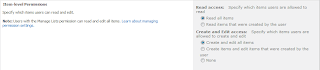
In SharePoint 2010, all lists have advanced settings where you can edit some of the Item-level Permissions. These item-level permissions give you the ability to override the default permissions users have to the list which can be beneficial if you want alter permissions to a specific list without needing to create new roles or moving around users. The figure below shows what options are available.
Since this overrides the default permission levels, the question was raised "what permission was required to override these settings?"
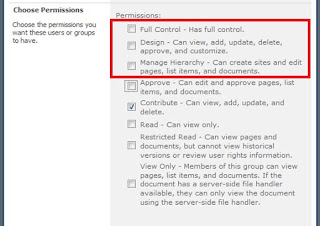
Let's start off by looking at the predefined roles that are provided OOTB. These roles each have a custom set of permissions associated with them. The image below displays these roles and I have highlighted with a red box the roles that will override the permissions set to the List Access of the SharePoint List. In OOTB terms, anything with a higher permission than “Approve” would override the list settings we are referring to starting at “Manage Hierarchy”.
The table below shows the Manage Hierarchy Role permissions on the left column and the “Approve” role on the right column. The permission level that grants the user ability to override the setting is highlighted in yellow inside the document.
Manage Hierarchy
Approve
Select the permissions to include in this permission level.
Select All
List Permissions
Manage Lists - Create and delete lists, add or remove columns in a list, and add or remove public views of a list.
Override Check Out - Discard or check in a document which is checked out to another user.
Add Items - Add items to lists and add documents to document libraries.
Edit Items - Edit items in lists, edit documents in document libraries, and customize Web Part Pages in document libraries.
Delete Items - Delete items from a list and documents from a document library.
View Items - View items in lists and documents in document libraries.
Approve Items - Approve a minor version of a list item or document.
Open Items - View the source of documents with server-side file handlers.
View Versions - View past versions of a list item or document.
Delete Versions - Delete past versions of a list item or document.
Manage Permissions - Create and change permission levels on the Web site and assign permissions to users and groups.
View Web Analytics Data - View reports on Web site usage.
Create Subsites - Create subsites such as team sites, Meeting Workspace sites, and Document Workspace sites.
Manage Web Site - Grants the ability to perform all administration tasks for the Web site as well as manage content.
Add and Customize Pages - Add, change, or delete HTML pages or Web Part Pages, and edit the Web site using a Microsoft SharePoint Foundation-compatible editor.
Apply Themes and Borders - Apply a theme or borders to the entire Web site.
Apply Style Sheets - Apply a style sheet (.CSS file) to the Web site.
Create Groups - Create a group of users that can be used anywhere within the site collection.
Browse Directories - Enumerate files and folders in a Web site using SharePoint Designer and Web DAV interfaces.
View Pages - View pages in a Web site.
Enumerate Permissions - Enumerate permissions on the Web site, list, folder, document, or list item.
Browse User Information - View information about users of the Web site.
Manage Alerts - Manage alerts for all users of the Web site.
Use Remote Interfaces - Use SOAP, Web DAV, the Client Object Model or SharePoint Designer interfaces to access the Web site.
Use Client Integration Features - Use features which launch client applications. Without this permission, users will have to work on documents locally and upload their changes.
Open - Allows users to open a Web site, list, or folder in order to access items inside that container.
Edit Personal User Information - Allows a user to change his or her own user information, such as adding a picture.
Personal Permissions
Manage Personal Views - Create, change, and delete personal views of lists.
Add/Remove Personal Web Parts - Add or remove personal Web Parts on a Web Part Page.
Update Personal Web Parts - Update Web Parts to display personalized information.
Select the permissions to include in this permission level.
Select All
List Permissions
Manage Lists - Create and delete lists, add or remove columns in a list, and add or remove public views of a list.
Override Check Out - Discard or check in a document which is checked out to another user.
Add Items - Add items to lists and add documents to document libraries.
Edit Items - Edit items in lists, edit documents in document libraries, and customize Web Part Pages in document libraries.
Delete Items - Delete items from a list and documents from a document library.
View Items - View items in lists and documents in document libraries.
Approve Items - Approve a minor version of a list item or document.
Open Items - View the source of documents with server-side file handlers.
View Versions - View past versions of a list item or document.
Delete Versions - Delete past versions of a list item or document.
Manage Permissions - Create and change permission levels on the Web site and assign permissions to users and groups.
View Web Analytics Data - View reports on Web site usage.
Create Subsites - Create subsites such as team sites, Meeting Workspace sites, and Document Workspace sites.
Manage Web Site - Grants the ability to perform all administration tasks for the Web site as well as manage content.
Add and Customize Pages - Add, change, or delete HTML pages or Web Part Pages, and edit the Web site using a Microsoft SharePoint Foundation-compatible editor.
Apply Themes and Borders - Apply a theme or borders to the entire Web site.
Apply Style Sheets - Apply a style sheet (.CSS file) to the Web site.
Create Groups - Create a group of users that can be used anywhere within the site collection.
Browse Directories - Enumerate files and folders in a Web site using SharePoint Designer and Web DAV interfaces.
View Pages - View pages in a Web site.
Enumerate Permissions - Enumerate permissions on the Web site, list, folder, document, or list item.
Browse User Information - View information about users of the Web site.
Manage Alerts - Manage alerts for all users of the Web site.
Use Remote Interfaces - Use SOAP, Web DAV, the Client Object Model or SharePoint Designer interfaces to access the Web site.
Use Client Integration Features - Use features which launch client applications. Without this permission, users will have to work on documents locally and upload their changes.
Open - Allows users to open a Web site, list, or folder in order to access items inside that container.
Edit Personal User Information - Allows a user to change his or her own user information, such as adding a picture.
Personal Permissions
Manage Personal Views - Create, change, and delete personal views of lists.
Add/Remove Personal Web Parts - Add or remove personal Web Parts on a Web Part Page.
Update Personal Web Parts - Update Web Parts to display personalized information.